
This article is part of the Production Automation Foundations series.
Automation isn’t a maturity badge. It’s a design choice.
Most production environments already have some automation: CI pipelines, infrastructure provisioning, alert routing, maybe even automated remediation. That’s good. But somewhere along the way, many teams absorb an unspoken rule:
If it can be automated, it should be.
That mindset quietly increases risk.
Not everything benefits from automation. Some work is better left manual — at least until the system, the process, or the organization is ready.
This article isn’t about how to automate. It’s about deciding whether you should — including situations where automation is the wrong answer altogether, as explored further in When Automation Is the Wrong Answer.
If you already automate parts of your stack, this is for you.
Automation Is a Tradeoff, Not a Goal
Automation exchanges one type of effort for another.
You reduce operational toil, but you increase:
- System complexity
- Failure coupling
- Debugging difficulty
- Dependency on code correctness
Every automated workflow becomes production software. It needs versioning, testing, monitoring, and ownership.
So the real question isn’t:
“Can we automate this?”
It’s:
“Does automation reduce overall operational risk for this task?”
That framing changes everything.
Characteristics of Safe Automation Candidates
Some tasks naturally benefit from automation. They share a few common traits.
Not as a checklist — as a pattern.
They are frequent and boring
If something happens multiple times per week and follows the same steps every time, humans will eventually make mistakes.
Examples:
- Rotating short-lived credentials
- Rebuilding stateless nodes
- Applying standard OS patches
These are ideal automation targets because repetition amplifies human error.
Frequency matters more than effort.
A task that takes five minutes but happens daily is often a better automation candidate than a complex quarterly procedure.
They are well-understood
Good automation is built on clarity.
You should be able to answer:
- What exactly triggers this?
- What are the expected outcomes?
- What are the known failure modes?
If the process still lives in tribal knowledge or Slack threads, automating it just encodes uncertainty.
A common failure mode: automating something while the team is still discovering how it actually works.
That’s premature.
Stabilize first. Then automate.
They are easy to validate
Automated actions should produce observable, verifiable results.
Examples:
- Service health checks after deployment
- Schema migration completion status
- Node readiness signals
If you can’t quickly confirm success, automation becomes blind execution.
You want fast feedback loops. Without them, automation hides problems instead of preventing them.
They fail safely
This is critical.
Safe automation doesn’t require heroics when it breaks.
Good candidates:
- Retryable operations
- Idempotent changes
- Tasks with built-in guardrails
Bad candidates:
- One-shot destructive actions
- Irreversible data movement
- Complex workflows with partial success states
If failure leaves your system in a confusing or unrecoverable condition, that’s a strong signal to slow down.
Warning Signs Something Should Stay Manual
Some work looks automatable but carries hidden risk.
Here’s where experienced operators usually pause.
The blast radius is large and hard to predict
If a mistake could affect:
- Multiple regions
- Shared databases
- Core identity systems
…you want a human in the loop.
Especially when dependencies aren’t fully mapped.
Automated systems are very good at failing fast and broadly.
Manual execution adds friction — and that friction is often what saves you.
The decision requires situational judgment
Some actions depend on context:
- Is this outage customer-visible or internal?
- Is traffic currently spiking?
- Are we mid-incident?
These aren’t binary inputs. They require interpretation.
If your runbook starts with “it depends,” full automation is probably premature.
Partial automation (data gathering, preflight checks, recommendation output) is often the better middle ground.
The process changes frequently
If the workflow evolves every few weeks, automation becomes a maintenance burden.
You’ll spend more time updating scripts than doing the task manually.
This usually happens with:
- Young systems
- Rapidly changing architectures
- Experimental features
Let the process mature before you codify it.
Recovery is unclear
Ask this directly:
“If this automation misfires at 3 a.m., do we know exactly how to undo it?”
If the answer isn’t obvious, stop.
Manual execution forces operators to think about rollback before proceeding. Automation often skips that moment unless you design it explicitly.
Reversibility and Blast Radius Matter More Than Speed
Two concepts should dominate your automation decisions:
Reversibility
How easily can you undo the action?
- Can you roll back?
- Can you replay safely?
- Can you restore from backup?
Highly reversible actions are safer to automate early.
Low-reversibility actions demand more caution, more validation, and often human approval.
Think in terms of commit points — moments after which recovery becomes expensive or impossible.
Blast Radius
How much of the system is affected if something goes wrong?
Small blast radius:
- Restarting a single pod
- Recycling one worker node
Large blast radius:
- Modifying shared IAM policies
- Changing global routing rules
Automation scales impact. That’s its strength — and its danger.
The larger the blast radius, the more deliberate you should be.
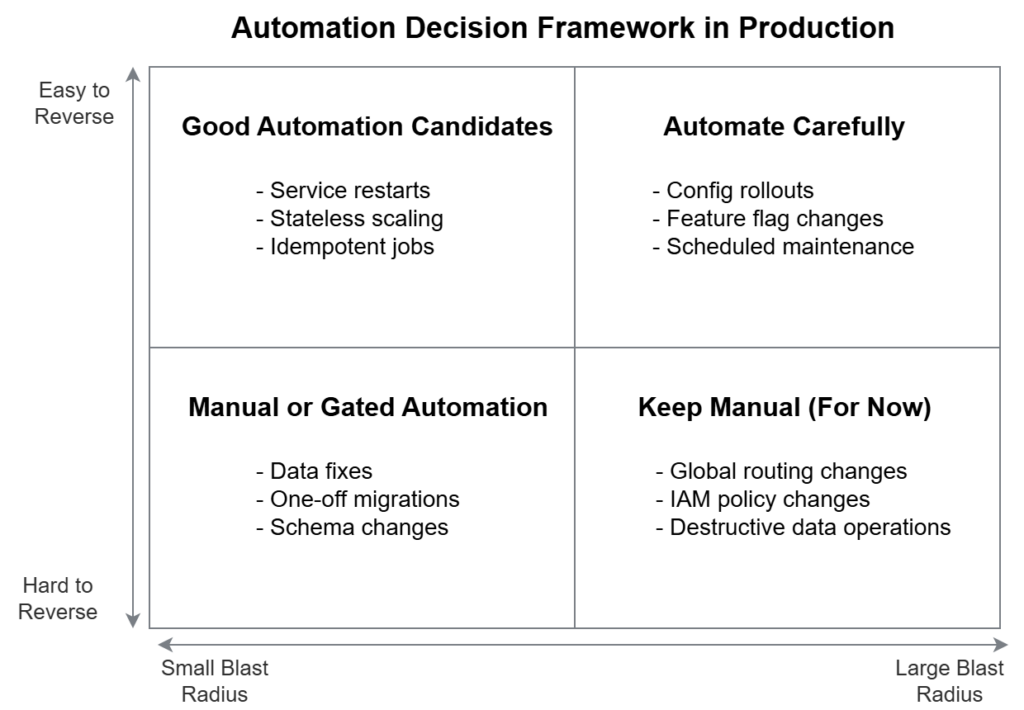
A practical mental model
Instead of asking “should we automate this,” plot work along two axes:
- Reversibility (easy ↔ hard)
- Blast radius (small ↔ large)
Tasks that are:
- Easy to reverse
- Limited in scope
…are prime automation candidates.
Tasks that are:
- Hard to undo
- Broad in impact
…deserve manual control or gated automation.
Everything else lives in between.
How Teams Revisit Automation Decisions Over Time
Good teams don’t make automation decisions once.
They revisit them.
A task that was too risky to automate six months ago might be safe today because:
- Observability improved
- Architecture stabilized
- Failure modes are better understood
- Rollback paths were built
Conversely, something automated early may later deserve tighter controls as system criticality grows.
Mature operations teams treat automation as a living system, not a finish line.
Common progression:
- Manual execution with documentation
- Tooling for visibility and validation
- Partial automation with human approval
- Full automation with guardrails
Each step is earned through understanding, not ambition.
Manual Work Is Not Failure — It’s Risk Control
There’s a quiet pressure in our industry to automate everything.
Resist it.
Manual execution isn’t a lack of sophistication. It’s often a conscious safety mechanism.
Human-in-the-loop processes provide:
- Context awareness
- Intent verification
- Natural pause points
Those are features, not flaws.
The goal isn’t maximum automation.
The goal is minimum operational risk for acceptable effort.
Sometimes that means code.
Sometimes that means a person running a command after thinking carefully.
Both are valid engineering choices.
Related reading
- When Automation Is the Wrong Answer — when restraint leads to safer systems than automation
- From Scripts to Systems: When Automation Becomes Operations — how automation evolves into production-critical systems