
This article is part of the Production Automation Foundations series.
Automation promises consistency, speed, and fewer manual errors. In production, it can also quietly magnify every misunderstanding you already have.
Most automation failures don’t start with broken scripts. They start with incomplete visibility.
A job runs successfully. The dashboard stays green. And three hours later, a downstream service starts timing out because a dependency was restarted, a firewall rule was regenerated, or a legacy system reacted in an unexpected way.
Nothing technically “failed.”
But the system still broke.
Without real visibility, automation becomes educated guessing.
Why Automation Fails Silently in Production Environments
In mature environments, automation rarely causes immediate, obvious outages. Instead, it introduces subtle changes that surface later:
- A scheduled task reconfigures a network interface used by an undocumented backup path
- A cleanup script removes “unused” resources that were actually part of a failover design
- A patching workflow reboots systems in the wrong order
These issues don’t show up in unit tests or dry runs. They appear in production, under load, often during incidents.
The common factor is missing context.
Automation executed exactly what it was told to do.
The problem is that nobody fully understood what the system actually depended on.
Automation didn’t fail. The model of the system was incomplete — especially where hidden dependencies were never made visible in the first place, as explored further in Hidden Dependencies: The Real Enemy of Safe Automation.
What “Visibility” Really Means in Production
Visibility is often confused with having dashboards, asset lists, or monitoring alerts.
That’s not enough.
In production environments, visibility is less about tools and more about shared understanding.
Real operational visibility means understanding:
- What systems exist
- How they are connected
- Who owns them
- What depends on what
- What breaks if something changes
It includes:
- Network paths, not just IP addresses
- Service dependencies, not just running processes
- Ownership and escalation paths, not just hostnames
- Change history, not just current state
Visibility answers questions like:
- If I restart this node, what else is affected?
- Why does this service require that legacy VM?
- Who approved this firewall exception five years ago?
- What business process depends on this cron job?
If you can’t answer those questions reliably, you don’t have visibility. You have partial observation.
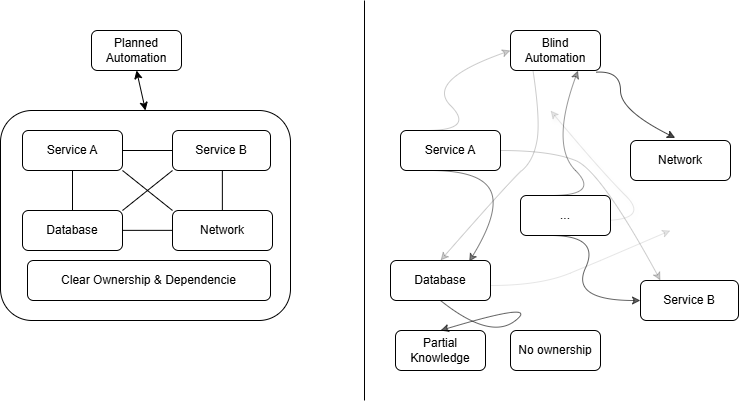
The difference is not in tooling, but in understanding dependencies and ownership.
Common Visibility Gaps in Production Environments
Most production environments accumulate blind spots over time. This is normal, especially when systems evolve faster than documentation.
Some common examples:
Orphaned Systems
Servers or VMs that nobody actively manages but are still critical.
They stay online because “things break when we touch them.”
Automation sees them as just another node.
Reality says otherwise.
Hidden Dependencies
Applications relying on:
- Shared storage paths
- Hardcoded IPs
- Old DNS entries
- Unofficial integration points
These dependencies rarely appear in inventories. They surface during outages.
Unknown Ownership
Systems without clear responsibility.
When automation impacts them, nobody knows who should investigate.
Tribal Knowledge
Key operational details living only in someone’s memory.
When that person is on vacation, automation becomes dangerous.
Monitoring Is Not System Knowledge
Monitoring tells you what is happening.
It does not tell you why it is happening or what will happen next.
You can have:
- CPU graphs
- Disk alerts
- Service health checks
…and still not understand:
- Which services rely on that host
- Why that traffic pattern exists
- Whether a restart is safe
Monitoring is reactive.
Visibility is contextual.
Monitoring answers:
“What is broken?”
Visibility answers:
“What will break if I change this?”
They serve different purposes.
How Automation Behaves When Visibility Is Missing
Automation doesn’t compensate for missing understanding. It accelerates mistakes.
Here’s what typically happens:
It Enforces Incorrect Assumptions
If your automation assumes:
- All servers are stateless
- All services restart cleanly
- All dependencies are documented
Those assumptions become embedded in code.
Now every run repeats the same flawed logic.
It Creates Fast, Repeatable Incidents
Manual errors are slow and inconsistent.
Automated errors are fast and perfectly reproducible.
One bad rule can propagate across dozens of systems in seconds.
It Hides Responsibility
When something breaks, people say:
“The automation did it.”
But automation doesn’t make decisions. Humans do.
Scripts just execute them.
Practical Ways to Build Visibility Before Automation
You don’t need perfect documentation to start. You need enough understanding to avoid blind changes.
Here are realistic steps that work in imperfect environments.
Start With Dependency Mapping
Before automating anything impactful:
- Identify upstream and downstream services
- Trace network paths
- Confirm storage relationships
- Validate DNS dependencies
Even rough diagrams help.
If you can’t draw it, you probably don’t understand it.
Establish Ownership
Every system should have:
- A responsible team or person
- A contact method
- A basic purpose description
Automation touching ownerless systems is a liability.
Capture Operational Knowledge
Write down:
- Restart orders
- Known failure modes
- Historical workarounds
- Maintenance constraints
This doesn’t need to be pretty.
It needs to exist and be accessible.
Automate Narrowly at First
Avoid broad “everything” automation.
Start with:
- Single services
- Clearly defined workflows
- Low-risk tasks
Expand only when behavior is predictable.
Expect Exceptions
Legacy systems, vendor appliances, and one-off integrations will not fit clean models.
Design automation to allow exclusions.
Reality always has edge cases.
Automation collapses without the layers beneath it.
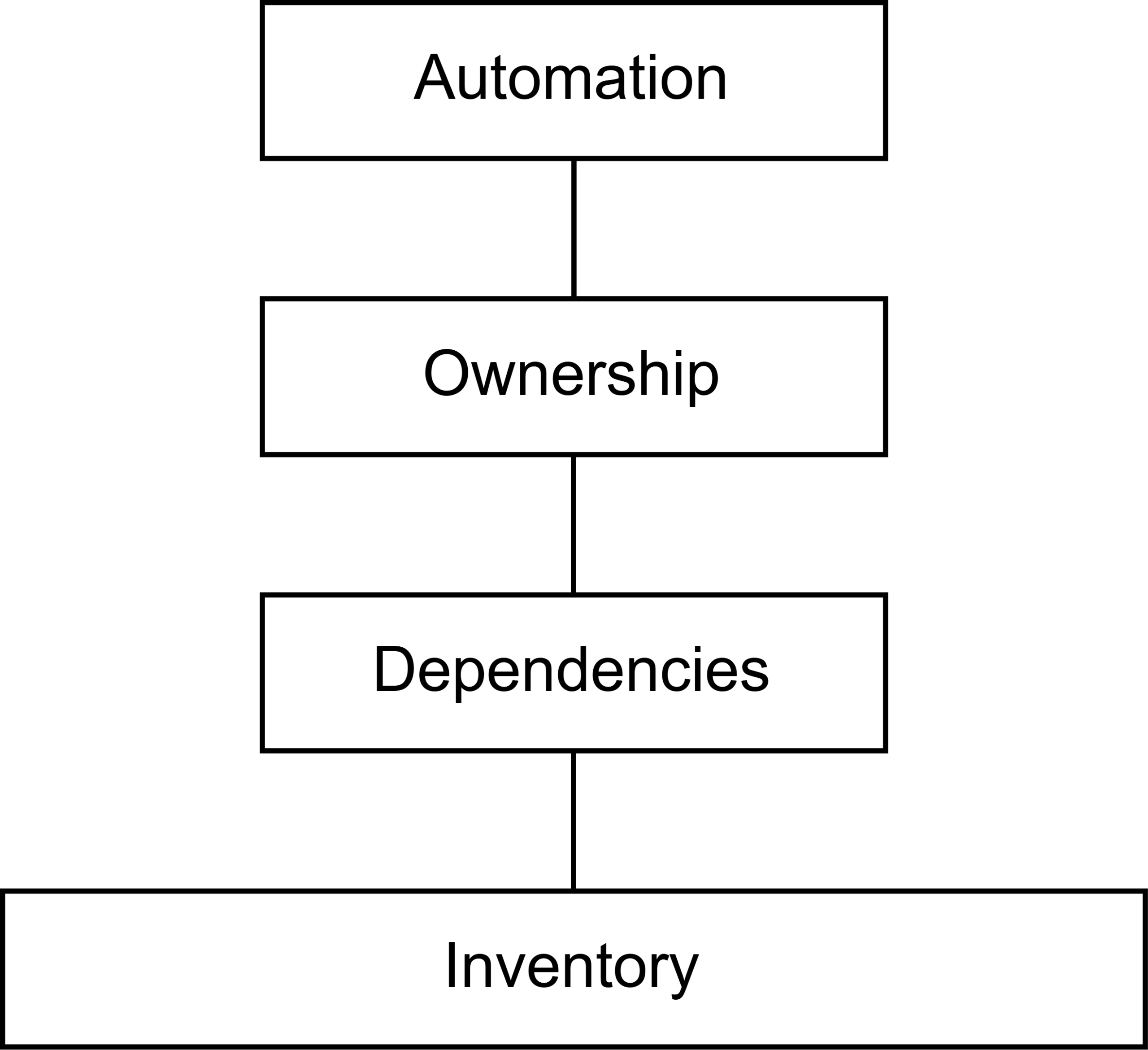
Without inventory, dependencies, and ownership, automation has nothing solid to stand on.
Final Thoughts: Automate With Eyes Open
Automation is not a shortcut — especially in production environments where teams often misunderstand what automation really means in production.
It is a force multiplier.
If your visibility is weak, automation will amplify that weakness.
If your documentation is outdated, automation will codify it — often in ways that cause automation to fail silently in production.
If your ownership model is unclear, automation will expose it during incidents.
This doesn’t mean automation is dangerous.
It means it requires discipline.
Start by learning your systems.
Map dependencies.
Clarify responsibility.
Accept constraints.
Then automate carefully.
Because in production, automation without visibility isn’t efficiency.
It’s guesswork.
Related reading
- Hidden Dependencies: The Real Enemy of Safe Automation — why unseen couplings often matter more than the automation itself
- Why Automation Often Reduces Reliability Before It Improves It — how automation amplifies weak assumptions and fragile system behavior